Thursday, August 30, 2012

Sorting WSDL type elements using XSLT before using Salesforce wsdl2apex

After using the Salesforce wsdl2apex to generate apex I'll often need to make some tweaks by hand to allow for automated testing.

When regenerating for WSDL updates I've found the order of the elements can change dramatically. With large WSDLs this can make migrating the changes by hand a time consuming exercise.

For example, below is the SourceGear DiffMerge overview from two versions of a 5000 line WSDL. (Turned on it's side)

WSDL diff

It isn't clear to me why the order of the XML elements is changing so much between versions, but it does make tracking the actual differences more difficult.

One possible solution I've found is to run the WSDL through an XSLT to sort the various elements by name.

I've appropriated the following from Glen Mazza - Using XSLT to organize SOAP contracts (WSDLs and XSDs)

One easy way to apply it is to open the WSDL in Visual Studio as XML and then use XML > Start XSLT Debugging to apply it.

After processing the line counts went from 3475 and 5005 to 3472 and 5002 respectively. Now I can clearly see where new elements have been added in the diff:

WSDL diff after sorting
<?xml version="1.0" encoding="UTF-8"?>

<!DOCTYPE stylesheet [
<!ENTITY space "<xsl:text> </xsl:text>">
<!ENTITY ivSp "<xsl:text>    </xsl:text>">
<!ENTITY tab "<xsl:text>	</xsl:text>">
<!ENTITY cr "<xsl:text>
</xsl:text>">
]>

<xsl:stylesheet version="1.0"
   xmlns:xsl="http://www.w3.org/1999/XSL/Transform"
   xmlns:xs="http://www.w3.org/2001/XMLSchema"
   xmlns:wsdl="http://schemas.xmlsoap.org/wsdl/"
   xmlns:wsu="http://docs.oasis-open.org/wss/2004/01/oasis-200401-wss-wssecurity-utility-1.0.xsd"
   xmlns:wsp="http://schemas.xmlsoap.org/ws/2004/09/policy">

   <xsl:template match="wsdl:definitions">
       &cr;
       <!-- By itself, xsl:copy outputs only the element referred to.
            It needs additional coding as below to copy the
            element's attributes and descendant elements.
       -->
       <xsl:copy>
          <!-- output all attributes of the top-level element -->
          <xsl:for-each select="@*">
              <xsl:copy/>
          </xsl:for-each>&cr;

          <xsl:for-each select="./wsdl:types">
              &ivSp;<wsdl:types>&cr;
                  <xsl:apply-templates select="./xs:schema"/>
              &ivSp;</wsdl:types>&cr;
          </xsl:for-each>

          <xsl:for-each select="./wsdl:message">
              <xsl:sort select="@name"/>
              <xsl:apply-templates select="."/>
          </xsl:for-each>

          <xsl:for-each select="./wsdl:portType">
              <xsl:apply-templates select="."/>
          </xsl:for-each>

          <xsl:for-each select="./wsdl:binding">
              <xsl:sort select="@name"/>
              <xsl:apply-templates select="."/>
          </xsl:for-each>

          <xsl:for-each select="./wsp:Policy">
              <!--if wish to sort: xsl:sort select="@wsu:Id"/-->
              &ivSp;<xsl:copy-of select="."/>&cr;
          </xsl:for-each>

          <xsl:for-each select="./wsdl:service">
              &ivSp;<xsl:copy-of select="."/>&cr;
          </xsl:for-each>

       </xsl:copy>

   </xsl:template>

   <!--
      Each immediate child of the top-level element is indented four spaces
      from the top-level item.  May need to convert original WSDL from tabs
      to spaces first.
   -->
   <xsl:template match="wsdl:message">
       &ivSp;<xsl:copy-of select="."/>&cr;
   </xsl:template>

   <xsl:template match="wsdl:portType | wsdl:binding">
    &ivSp;<xsl:copy>
          <!-- output all (@*) attributes of the top-level element -->
          <xsl:for-each select="@*">
              <xsl:copy/>
          </xsl:for-each>&cr;
     
          <xsl:for-each select="./*[not(self::wsdl:operation)]">
              &ivSp;&ivSp;<xsl:copy-of select="."/>&cr;
          </xsl:for-each>

          <xsl:for-each select="./wsdl:operation">
              <xsl:sort select="@name"/>
              <xsl:apply-templates select="."/>
          </xsl:for-each>&ivSp;

        </xsl:copy>&cr;
   </xsl:template>

   <xsl:template match="wsdl:operation">
       &ivSp;&ivSp;<xsl:copy-of select="."/>&cr;
   </xsl:template>

   <xsl:template match="xs:schema">

       &ivSp;&ivSp;<xsl:copy> 
          <!-- output all (@*) attributes of the top-level xs:schema element -->
          <xsl:for-each select="@*"> 
              <xsl:copy/>
          </xsl:for-each>&cr;
          
          <xsl:for-each select="./xs:import">
              <xsl:apply-templates select="."/>
          </xsl:for-each>
      
          <xsl:for-each select="./xs:simpleType">
              <!-- sort the simpleTypes by their name attribute first -->
              <xsl:sort select="@name"/> 
              <xsl:apply-templates select="."/>
          </xsl:for-each>
      
          <xsl:for-each select="./xs:complexType">
              <xsl:sort select="@name"/>
              <xsl:apply-templates select="."/>
          </xsl:for-each>

          <xsl:for-each select="./xs:element">
              <xsl:sort select="@name"/>
              <xsl:apply-templates select="."/>
          </xsl:for-each>
       &ivSp;&ivSp;</xsl:copy>&cr;

   </xsl:template>

   <xsl:template match="xs:import | xs:simpleType | xs:complexType | xs:element">
       <!-- Unlike xsl:copy above, xsl:copy-of automatically copies the 
            element's attributes and its descendant elements. -->
       &ivSp;&ivSp;&ivSp;<xsl:copy-of select="."/>&cr;
   </xsl:template>

</xsl:stylesheet>

Saturday, August 25, 2012

Issues/differences encountered converting WP7 apps to Windows 8

Tone the Visual Studio 2012 MENUS DOWN

Changing the All-Caps menu in Visual Studio 2012 to something more readable. Install the VS Commands extension

Tools > VSCommands > Options > IDE Enhancements > Main Menu > Change Main Menu letter case

int? Properties in custom user controls

Binding to a nullable int property in a custom user control produces the following error:

Failed to create a 'Windows.Foundation.IReference`1<Int32>' from the text '40'. 

Internally most of the .NET primitive types are converted to equivalent Windows Runtime types. IReference<T> is the Windows Runtime equivalent of Nullable<T> in .NET.

"Setting nullable properties [in] custom controls is not a supported scenario".

XAML Error : Value Type Nullable is not allowed on property in XAML Windows 8 Dev Tip: Nullable Dependency Properties and Binding

Tap Event

The Tap event with GestureEventArgs becomes a Tapped event with TappedRoutedEventArgs


MessageBox.Show

MessageBox.Show is replaced by Windows.UI.Popups.MessageDialog

MessageDialog.Show("Some Message");
async private void ShowDialog() {
    await new Windows.UI.Popups.MessageDialog("Some Message").ShowAsync();
}

There is no WebBrowserTask

WebBrowserTask task = new WebBrowserTask();
            task.Uri = new Uri("http://www.fishofprey.com/");
            task.Show();
async public void Show()
        {
            await Launcher.LaunchUriAsync(new Uri("http://www.fishofprey.com/"));
        }

General Namespace issues

"System.Windows" with "Windows.UI.Xaml"

Differences in StaticResource Styles

WP7

Style="{StaticResource PhoneTextTitle3Style}

Windows 8

Style="{StaticResource SubtitleTextStyle}"

Text Styles

WP7 NamePossible Windows 8 Style
PhoneTextNormalStyleBasicTextStyle
PhoneTextTitle1StyleSubtitleTextStyle

Brush Resources

WP7 StylePossible Windows 8 StyleDescription
PhoneChromeBrushAppBarBackgroundThemeBrushUsed to match the application bar color

Theme Brushes


No direct equivalent for the Pivot control

"The Windows Runtime does not include the Pivot and Panorama controls available in Silverlight for Windows Phone. These controls are designed for the phone form factor, and help users navigate experiences that are larger than the phone screen. Your Metro style apps will usually have more screen space, and should take advantage of the greater flexibility of the Grid control. You can also use the FlipView control to provide a simple paging experience."
A WinRT behavior to turn a FlipView into a kind of Windows 8 Panorama

No direct equivalent for the PhoneNumberChooserTask

Use the Contact Picker contract. Sample

        private async void ActionButtonChoose_Click(object sender, RoutedEventArgs e)
        {
            var picker = new Windows.ApplicationModel.Contacts.ContactPicker();
            picker.CommitButtonText = "Select";
            picker.SelectionMode = Windows.ApplicationModel.Contacts.ContactSelectionMode.Fields;
            picker.DesiredFields.Add(Windows.ApplicationModel.Contacts.KnownContactField.PhoneNumber);
            var contactInformation = await picker.PickSingleContactAsync();

            if (contactInformation != null && contactInformation.PhoneNumbers.Count > 0)
            {
                  txtDail.Text = contactInformation.PhoneNumbers[0].Value;
            }
        }

No direct equivalent for the SmsComposeTask or EmailComposeTask

Windows Phone 7

SmsComposeTask composeSMS = new SmsComposeTask();
composeSMS.Body = "Greetings";
composeSMS.Show();

For WinRT there is SendSmsMessageOperation, but the documentation currently says:

Note This functionality is only available to mobile operator apps and Metro style apps given privileged access by mobile network operators, mobile broadband adapter IHV, or OEM.

Another option is to create a mailto URI. I haven't tested this yet, but it looks good in theory.

var mailto = new Uri("mailto:?to=recipient@example.com&subject=WinRT+email&body=Windows+8+Metro+app.");
await Windows.System.Launcher.LaunchUriAsync(mailto);

Share the content via the DataTransfer API. How to share text (Metro style apps using C#/VB/C++ and XAML)


No direct equivalent for the SQL CE database built into Mango using Isolated Storage


IsolatedStorageSettings isn't available.

Switch to Windows.Storage.ApplicationData.Current.RoamingSettings or another class under Windows.Storage.ApplicationData.


PhotoChooserTask isn't in WinRT

Use CameraCaptureUI

private async Task CapturePicture()
{
    var dialog = new CameraCaptureUI();
    dialog.PhotoSettings.Format = CameraCaptureUIPhotoFormat.Png;

    var file = await dialog.CaptureFileAsync(CameraCaptureUIMode.Photo);
    if (file != null)
    {
         IRandomAccessStream imageStream = await file.OpenAsync(Windows.Storage.FileAccessMode.Read);

    }
    return string.Empty;
}  

How to Capture Images w/ the WebCam in WinRT (C#) applications.


Binding doesn't have a StringFormat option

So a binding like Text="{Binding WordsPerMinute,StringFormat='WPM: {0}'}" results in the errors:

The member "StringFormat" is not recognized or is not accessible.
The property 'StringFormat' was not found in type 'Binding'.

Options:


WrapPanel doesn't (yet) exist in WinRT


See also:

Tuesday, August 7, 2012

WP7 magnetometer data from 360 degree rotation

This post is a continuation with my unhealthy obsession with why the compass API on Windows Phone 7 doesn't actually point north.

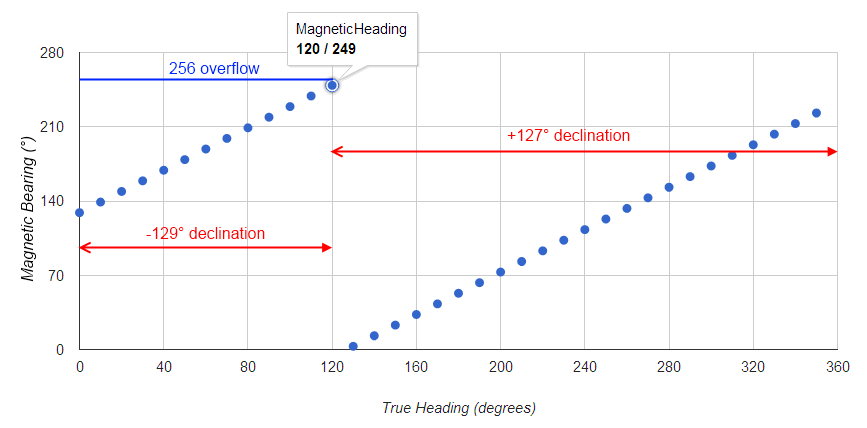
I captured the following data rotating my Nokia Lumia 800 a full 360 degrees. Admittedly the rotation by hand so there is a fair bit of noise in the readings.

What it does show is:

  1. the Magnetic Heading drastically changing when it reaches 256°
  2. the declination changing from -129° to +127°

Magnetic versus True Heading

Windows Phone 7 Magnetic versus True Bearing

Scatter plot of magnetometer readings

Magnetometer Axis Readings by Bearing rotation - radar

Magnetometer Axis Readings by Bearing rotation - line

See also:

Validation Errors when saving new Validation rule

The following error message was encountered when saving a new validation rule that referenced a single object relationship.

Validation Errors While Saving Record(s)

There were custom validation error(s) encountered while saving the affected record(s). The first validation error encountered was "The formula references fields across 11 relationships while only 10 are allowed. Please contact support at salesforce.com for more assistance.".

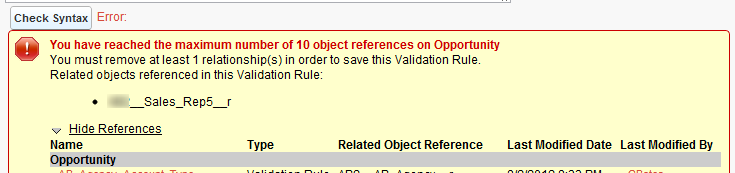
I found the message a bit confusing as there was only a single relationship referenced in the error condition formula. Going back to the validation rule edit page and pressing the Check Syntax button made the error clearer:

You have reached the maximum number of 10 object references on Opportunity

The other validation rules on Opportunity were already referencing 3 other objects across 10 different object references.

See also:

Friday, July 27, 2012

Salesforce "Missing Organization Feature: ProductSchedule" on managed package install

When installing a managed package the following error appeared:

Missing Organization Feature: ProductSchedule

This corresponds to the package requirements that were automatically checked when the managed package was uploaded.

This feature can be enabled in the target organization by checking the Scheduling Enabled for either Quantity Schedules or Revenue Schedules under App Setup > Customize > Products > Schedule Setup.

Monday, July 23, 2012

Apex Test cases fail when run in parallel

Currently, when running apex test cases via Apex Test Execution or ApexTestQueueItem records two cases execute at any one time.

Usually this isn't an issue, but if the test cases aren't fully isolated (i.e. they work on the same records) and data isolation is turned off failures can occur which wouldn't happen if they were run one at a time.

In my case I got the error message that the PriceBook2 (01s keyprefix) couldn't be updated:

System.DmlException: Update failed. First exception on row 0 with id 01s300000001OuYAAU; first error: UNABLE_TO_LOCK_ROW, unable to obtain exclusive access to this record: []

In the Summer 12 release there is now an option to run the test cases one at a time.
Your Name > Setup > Develop > Apex Test Execution > Options: Disable Parallel Apex Testing

Disable Parallel Apex Testing: Executes asynchronous tests one at a time. This helps prevent test interference on shared data when tests run at the same time and access the same data. This only occurs when tests don’t create their own data and turn off data isolation to access the organization’s data. This option doesn’t affect the asynchronous execution of tests, which continue to run asynchronously from the Apex Test Execution page.

The "unable to obtain exclusive access to this record" message has also been encountered when deploying a change set from the sandbox to production. What was particularly odd here was that the same change set had successfully passed validation but was not failing deployment. Disabling the parallel apex testing also resolved this issue.

Wednesday, July 4, 2012

Salesforce API_CURRENTLY_DISABLED: API is disabled for this User

The Partner API returned the following error for some new users accessing a system I maintain:

API_CURRENTLY_DISABLED: API is disabled for this User

In this case it was caused by the users Profile not having API access. Check
Administration Setup > Manage Users > Profiles > Users Profile > Administrative Permissions > API Enabled.